Find Fonts with Chrome & Firefox DevTools
Browser DevTools let you inspect the exact font rendered on any element. Here's how to use them - and when the URL scanner is the faster choice.
Chrome DevTools - Rendered Fonts
- 1Right-click any text on the page and select Inspect (or press Ctrl+Shift+I / Cmd+Option+I).
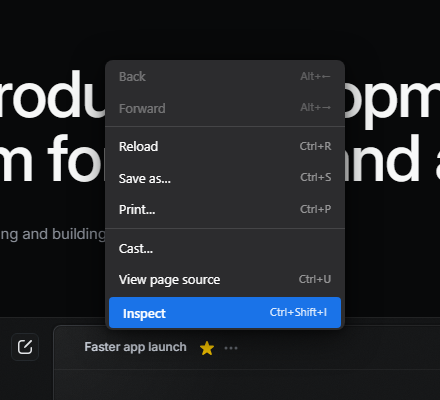 View full screenshot
Right-click on any text, then click Inspect - 2Chrome opens the Elements panel with the clicked element already highlighted in the DOM tree.
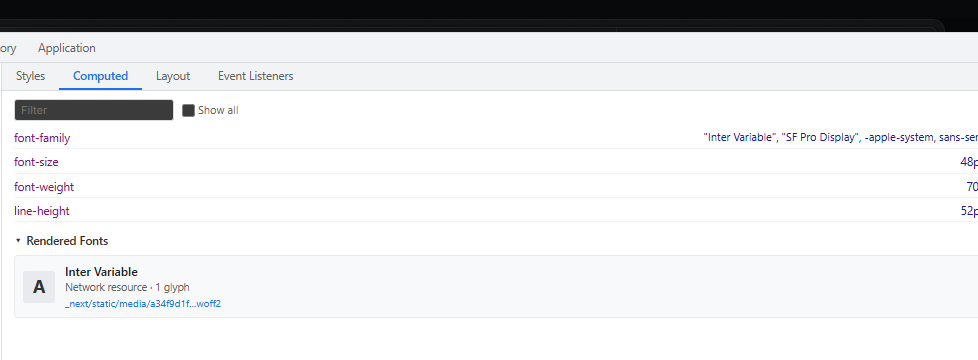
- 3In the right panel, click the Computed tab (second tab, next to Styles).
- 4Scroll down past the CSS properties to the Rendered Fonts section.
 View full screenshot
Computed tab - scroll to "Rendered Fonts" to see the active typeface - 5You see the exact typeface the browser used, the source file it loaded, and how many glyphs it drew from it.


Firefox DevTools - Fonts Tab
- 1Right-click any text and select Inspect (or press F12). The Inspector panel opens at the bottom.
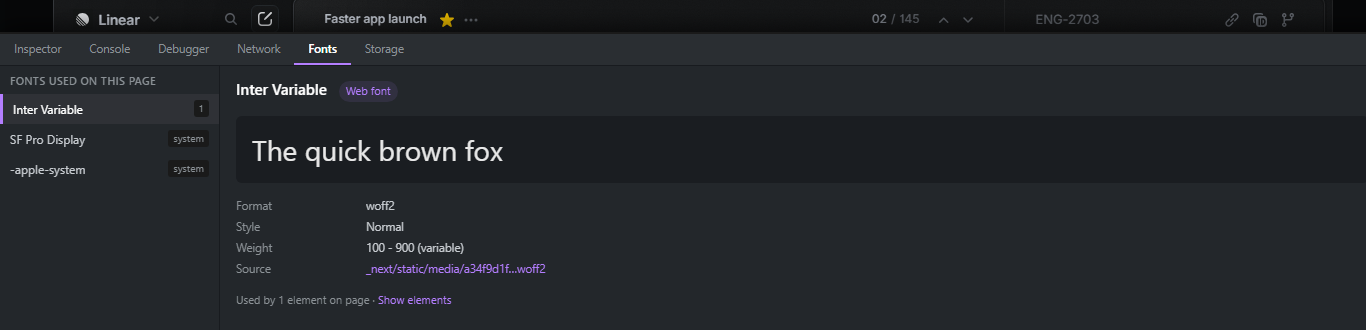
- 2In the right panel of the Inspector (where you normally see Rules and Computed), click the Fonts tab.
- 3The left column lists every font loaded on the page. Click a font name to see its specimen, weight range, format, and source URL.
 View full screenshot
Firefox Fonts tab - all page fonts listed on the left, details on the right

Limits of the DevTools Approach
DevTools works great for inspecting individual elements, but it won't give you a complete inventory of every font loaded by a page. You'd need to click through every text element manually. For a full audit - paste the URL below.
Faster: Scan the Full Page by URL
Paste any URL and get the complete list of all web fonts used - every @font-face rule, Google Fonts import, and CDN link - in one scan.
Frequently Asked Questions
What is "Rendered Fonts" in Chrome?
Rendered Fonts shows the actual typeface the browser used to draw the selected text - after applying font-family fallbacks and checking whether each font file loaded successfully. It can differ from the CSS font-family declaration.
Why does the rendered font differ from the CSS font-family?
font-family is a prioritised fallback list. If the first font fails to load (missing file, CORS error, unsupported format), the browser moves to the next candidate. Rendered Fonts shows what was actually used.
Can I find all fonts on a page with DevTools?
Firefox's Fonts tab shows every font loaded by the page. Chrome requires inspecting elements one by one. For a complete, automated inventory, use the URL scanner above.
Does the URL scanner also detect Google Fonts?
Yes - all font sources are detected: Google Fonts, Bunny Fonts, Fontshare, and self-hosted @font-face fonts.